Getting Assignments
Overview
There are four ways you can get assignments: getting all, upcoming, recent, or problematic assignments - just like in your normal iGrade account page. This is the most feature-packed element included in the module, so there is a lot to cover. We’ll start off with the basics, just getting our upcoming assignments. Other assignment types are covered below.
Upcoming Assignments
Note
Upcoming assignments are a little bit different than the others because of the way the data is returned. This is mainly because upcoming assignments do not include the grades and some other info.
These are the assignments that show up in the “upcoming” tab in your iGradePlus account under assignments. This is usually 10-20 assignments long.
See also
You are also now able to filter through assignments to only get assignments relevant to what you need. See Using Assignment Filters for more information and how to use them.
client.get_upcoming_assignments()
This will return a dictionary, of which you can see the visualization below:
Name
Link
Status (excludes upcoming assignments)
Semester
Assigned date
Due date
Type
Class
Full category
Abbreviated category
Teacher comments
All grade info (excludes upcoming assignments)
Extra details/info
You can also set get_attachments to True by typing
client.get_upcoming_assignments(get_attachments=True), which will
return the following:
All attachment names and links
Description
Supplemental info
While this does get much more info, it does take an extra 2-3 seconds. You can see the visualization below:
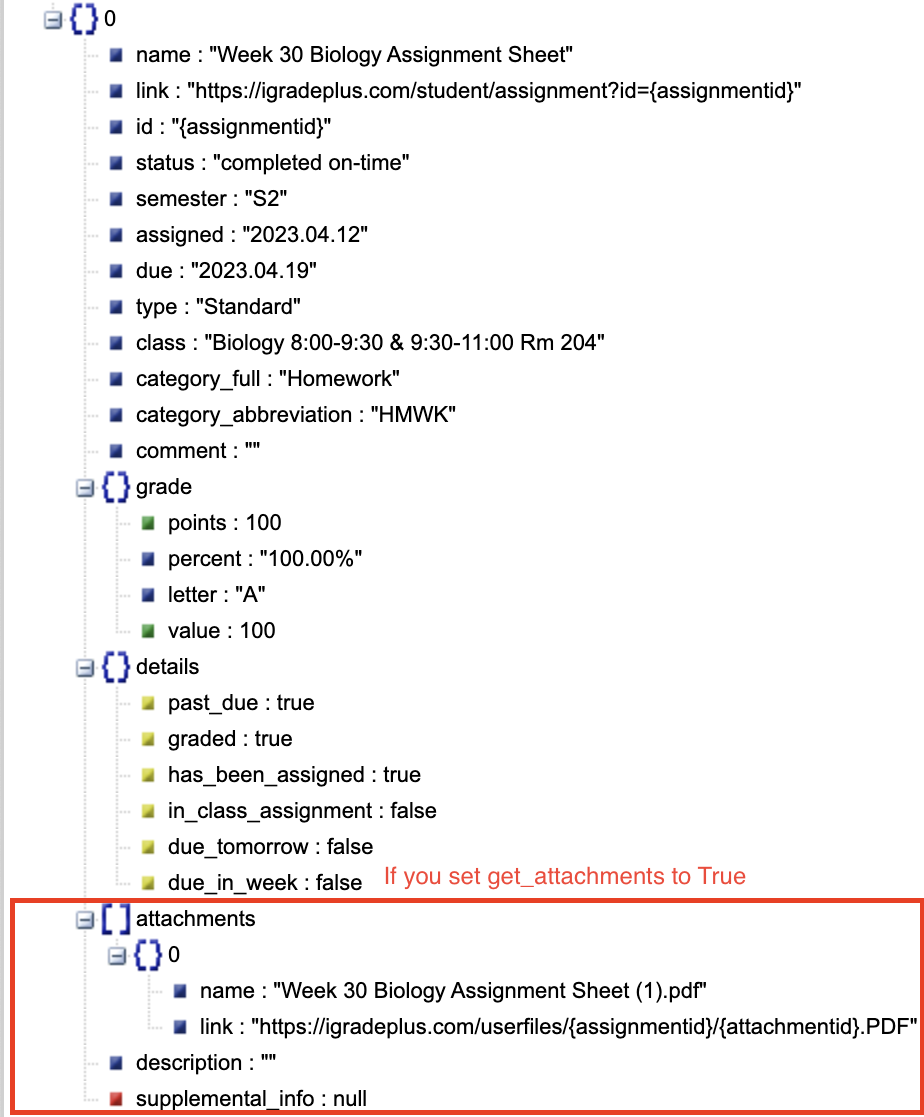
If you want to see this visualization yourself, use this code:
from igrade import Client
import json

username = ''
password = ''

client = Client()
client.login_with_credentials(username, password)

data = client.get_upcoming_assignments(get_attachments=True)
print(json.dumps(data))  # copy and paste output into https://jsonviewer.stack.hu

client.close()
Note
The “get assignment” methods return a list containing dicts, or dictionaries.
Use json.dumps() to convert the return data into a JSON string. There is little to
no difference between JSON and Python dictionaries, but you will need to convert it
before inputting it into a JSON visualizer like what is shown above.
Other Assignments Types
get_upcoming_assignments()This is the main assignment type. This is usually a list of 10-20 assignments, depending on the type of schooling you have. It reaches about 1-3 weeks into the future.
get_all_assignments()This gets all assignments, past and future, so while the list varies, it is always very long. This is the second most used assignments type.
get_recent_assignments()This gets assignments that have been due in the past week or two. This is usually just shorter than upcoming assignments.
get_problematic_assignments()This type of assignment are things that have a very low grade on, or are way past due. Hopefully, this is a low number. If not, you should probably spend more time on that than reading this documentation ;)
Filters
There is now an option to use filters with the 4 functions for getting assignments. You can filter by name, grade, date and much more. For more information, see this page.
Example Code
This section gives you an example program to get a head start using the module.
from igrade import Client

username = ''
password = ''

client = Client()
assignments = client.get_upcoming_attachments()

print(f'You have {len(assignments)} assignments due!}')

for assignment in assignments:
   print(f'{assignment["name"]} is due on {assignment["due"]}.')
   print(f'This assignments is worth {assignment["grade"]["value"]} points.\n')

client.close()